

Mouse and keyboard work just fine for strolling around New Babbage. But when it’s time to set a Cutlass down on a pad that’s a little too small, or to stay on a Gladius through a tight turn, we all end up eyeing joysticks. The good news: in 2026, there’s finally real choice for space sims, from a €130 starter kit to a cockpit north of a thousand euros. The bad news: there’s finally real choice, so you have to pick.
HOTAS or HOSAS: the choice that comes first
Before talking brands, you need to pick a philosophy.
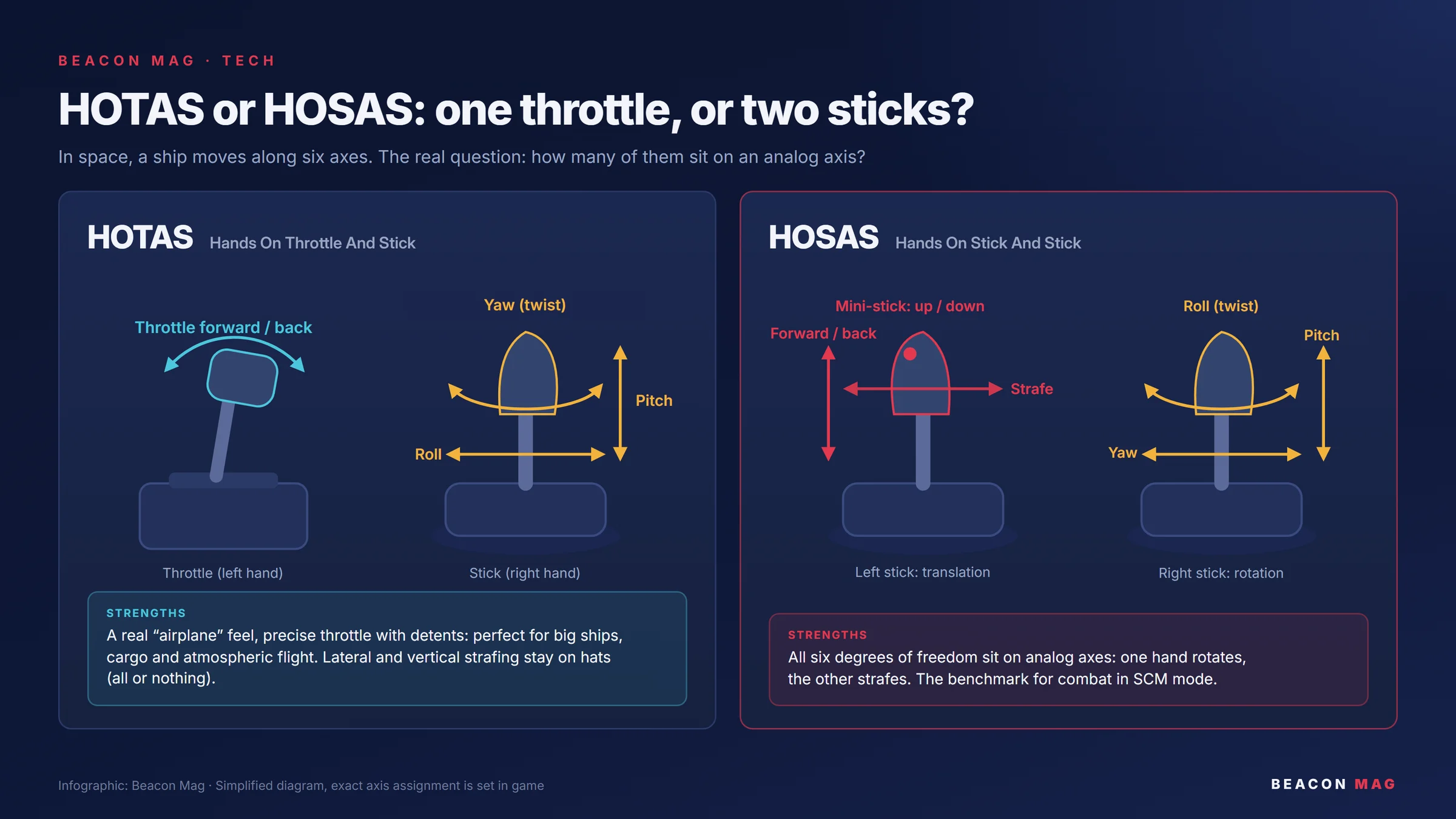
- HOTAS (Hands On Throttle And Stick: one stick and a throttle) gives you a real airplane feel. It’s perfect for big ships, hauling cargo and atmospheric flight. Its weakness in Star Citizen: lateral and vertical strafing stay on small buttons, all or nothing.
- HOSAS (Hands On Stick And Stick: two sticks) has become the standard for combat pilots. Your right hand handles rotation, your left hand handles translation. All six axes of a ship’s movement sit on analog controls, which changes everything in SCM mode.
For combat, we recommend HOSAS. For hauling or mining, HOTAS holds up very well (see the sidebar below).
The five HOSAS setups to look at in 2026
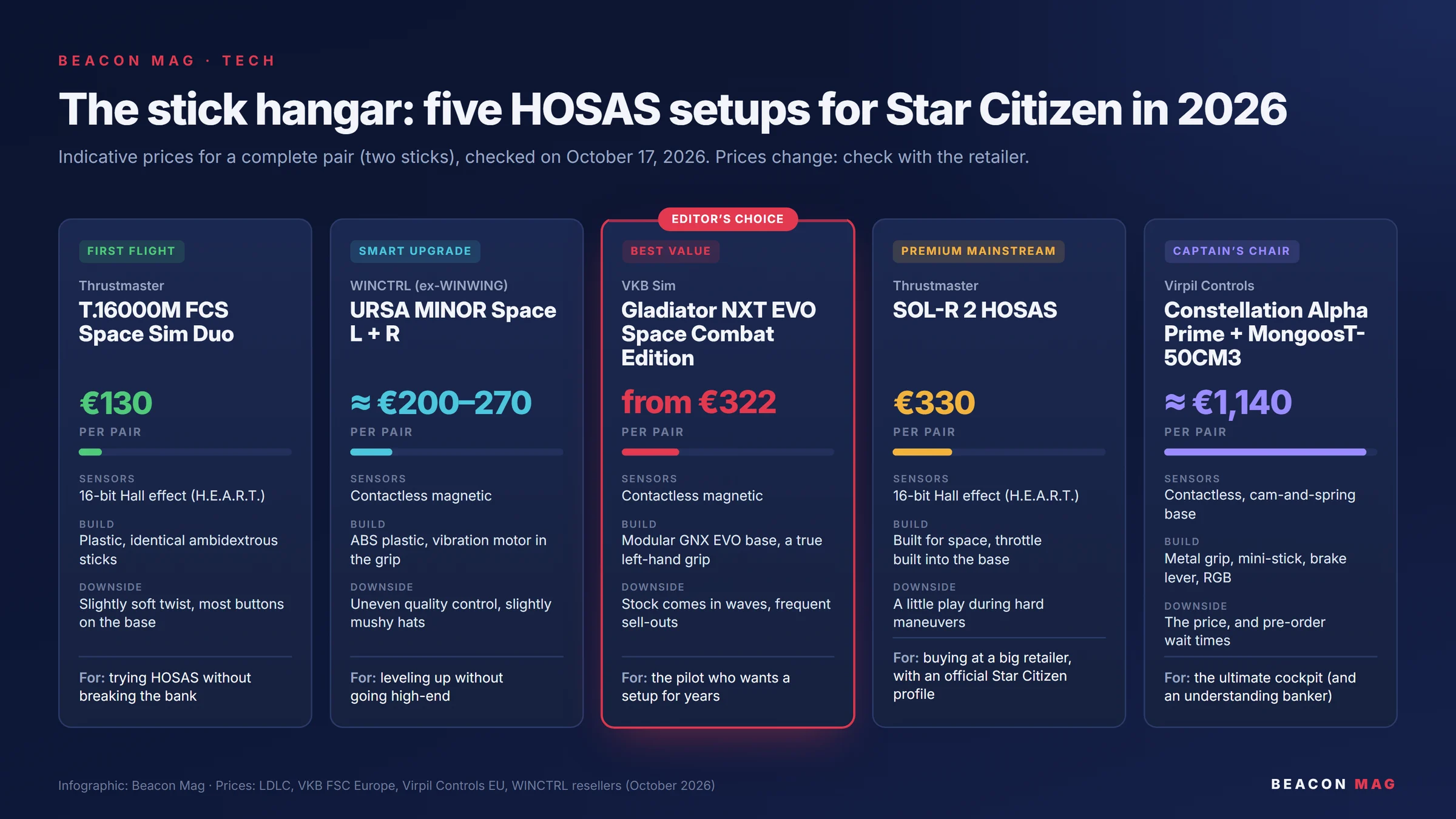
1. Thrustmaster T.16000M FCS Space Sim Duo: first flight
€129.95 per pair (European retail price) · See it at LDLC
This is the classic entry point, and it still holds up. Both sticks are ambidextrous, and their main axes use 16-bit magnetic Hall effect sensors (Thrustmaster’s H.E.A.R.T. technology), so no drift over time. The twist axis, however, uses a regular potentiometer, and that’s the part that wears out first. You get 16 buttons per stick.
- Pros: an unbeatable price, and almost every community-shared key profile exists for it.
- Cons: all plastic, a slightly soft twist, and lots of buttons on the base, far from your thumb.
2. WINCTRL URSA MINOR Space: the smart upgrade
About €200 to €270 per pair depending on the retailer (around $270 on the official store) · Official WINCTRL store
Quick news update: WINWING has been called WINCTRL since a rebrand in early 2026, so don’t go looking for the old logo. This pair is built for space: the left stick sits on an angled arm, which brings it closer to a throttle. The sensors are magnetic and contactless, the grip hides a vibration motor, and you adjust the tension through a hatch under the base.
- Pros: high-end features at this price, and it’s recognized right away in Star Citizen.
- Cons: lots of plastic, slightly mushy hats and uneven quality control. Buy it from a retailer with an easy return policy.
3. VKB Gladiator NXT EVO Space Combat Edition: editor’s choice
From €161 per stick, or about €322 per pair · See it at VKB FSC Europe
The best all-around pick right now. The SCG grip is designed for space combat and comes in a true left-handed version, not just a mirrored copy. The GNX EVO base is modular: you can add an SEM module for extra buttons and axes. This is the kind of gear that stays with a pilot for years.
- Pros: the best build quality at this price, a true left and right pair, plenty of room to upgrade.
- Cons: VKB produces in batches, so it’s often out of stock. Sometimes you have to watch for restocks like you’re waiting on a rare ship spawn.
- Step up: the Gunfighter Mk.IV SCE, about $309 per side in the US, for those who want a sturdier mechanism.
4. Thrustmaster SOL-R 2 HOSAS: premium mainstream
€329.95 per pair · See it at LDLC (out of stock as we write this, restock announced for December 31)
Thrustmaster’s first stick designed for space. Each stick has 21 buttons, a two-stage trigger and a throttle built into the base, for 44 actions per stick. The sensors are 16-bit H.E.A.R.T., and the grip switches between left- and right-handed thanks to interchangeable palm rests. Thrustmaster also publishes an official Star Citizen profile and key layout.
- Pros: a major brand, sold by big retailers, sturdy and ready to play.
- Cons: pricier than the VKB pair, and some users report a little play during the hardest maneuvers.
5. Virpil Constellation Alpha Prime + MongoosT-50CM3 base: the captain’s chair
About €1,140 per pair (per side: €249.95 for the grip and €319.95 for the base, sometimes on sale at €269.95) · Right grip · Left grip · Virpil bundles
This is the top of the line. The metal grip packs an analog mini-stick, a dual-stage trigger plus a flip trigger, a scroll wheel, a brake lever, an adjustable palm rest and RGB lighting. The base is tuned with interchangeable cams and springs. Once it’s dialed in, this is your forever cockpit.
- Pros: benchmark build quality and adjustability.
- Cons: the price, and pre-order wait times to plan for (the grip is on backorder as we write this). You’ll also want an understanding banker.
Sidebar: team HOTAS
If you spend more time in a Hull or a Prospector than in a fighter, HOTAS is still a great choice. Two options: the Thrustmaster T.16000M FCS HOTAS (about $170), or a VKB stick paired with the Gladiator NXT EVO Omni Throttle (about $149).
The verdict
- Tight budget: the T.16000M Duo, no question.
- Best value: the VKB Gladiator NXT EVO SCE, if you can find one in stock.
- No patience for restocks: the SOL-R 2, as soon as it’s back on shelves.
- Money is no object: Virpil, and you’ll never look back.
Once you’ve bought your gear, you still need to set it all up. That’s exactly what our guide, right below, covers.
Guide: mapping your joysticks in Star Citizen, from A to Z
You unboxed your sticks, plugged them in, launched the game… and your ship spins out on the pad. That’s normal. Star Citizen has more than 1,100 possible actions (1,103 in Alpha 4.10), hundreds of which have no default key at all. Here’s how to make sense of it, in the right order.
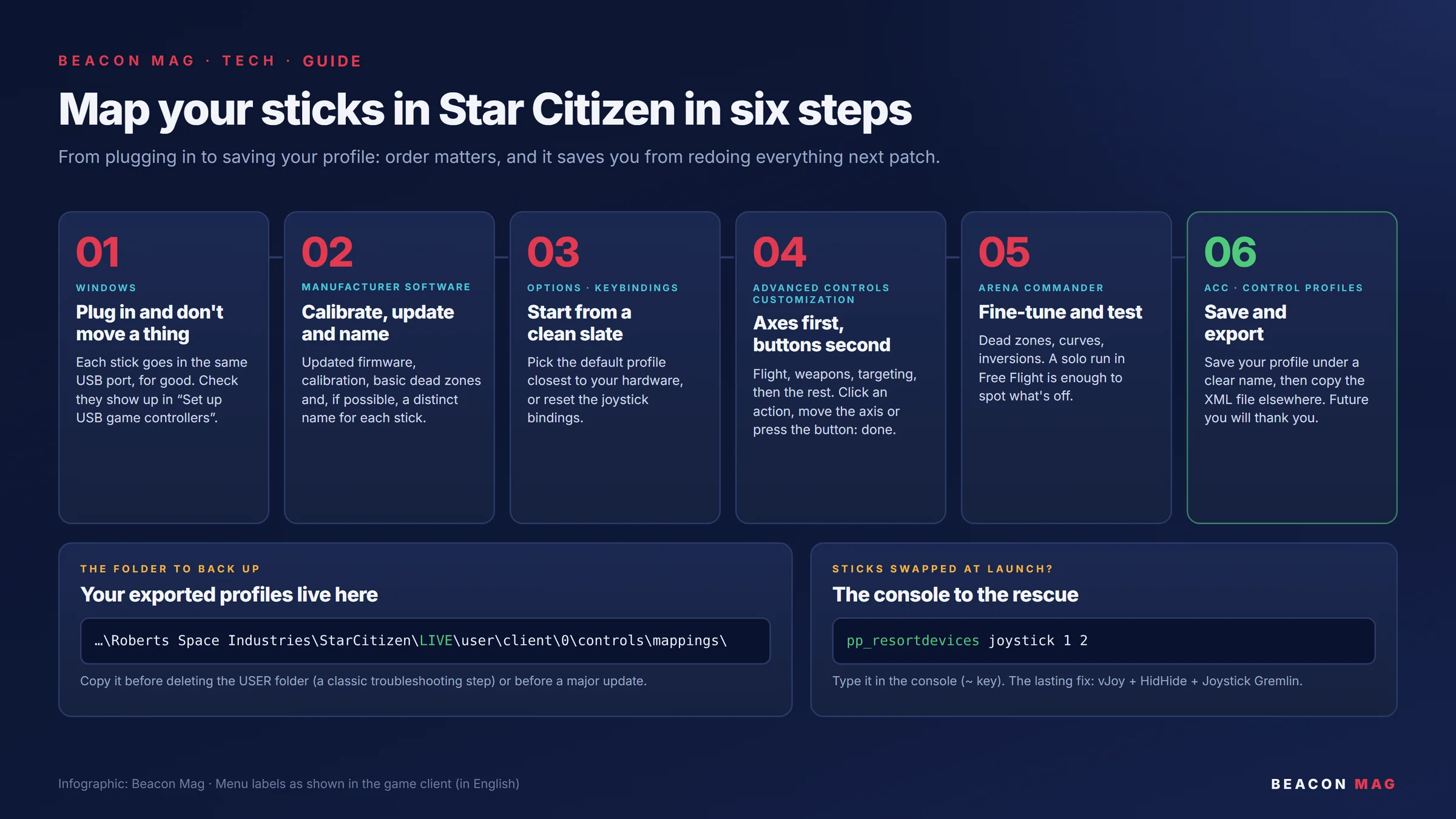
Step 1: plug in and don’t move a thing
Star Citizen names your sticks js1 and js2 based on the order Windows detects them. If you switch USB ports, they can swap, and your mapping goes with them.
- Pick one USB port for each stick, and never move them again.
- Make sure they respond: press the Windows key, type
joy.cpl, then open “Set up USB game controllers.”
Step 2: calibrate, update, name
Before you even launch the game, open your manufacturer’s tool: VKBDevCfg for VKB, VPC Configurator for Virpil, T.A.R.G.E.T or the control panel for Thrustmaster, and the WINCTRL software for the URSA.
- Update the firmware and calibrate the axes.
- Set basic dead zones, but only if an axis drifts on its own at rest.
- If the software allows it, give each stick a distinct name (“left,” “right”): they’ll be much easier to tell apart later.
- Pick one single place for your curves and dead zones: either the manufacturer’s software or the game. If you set them in both, the effects stack up and nothing makes sense anymore.
Step 3: start from a clean slate
In the game, go to Options > Keybindings. Load the default profile closest to your hardware, or reset the joystick bindings. The real work then happens in Advanced Controls Customization (ACC), the button at the bottom of the Keybindings screen.
Step 4: axes first, buttons second
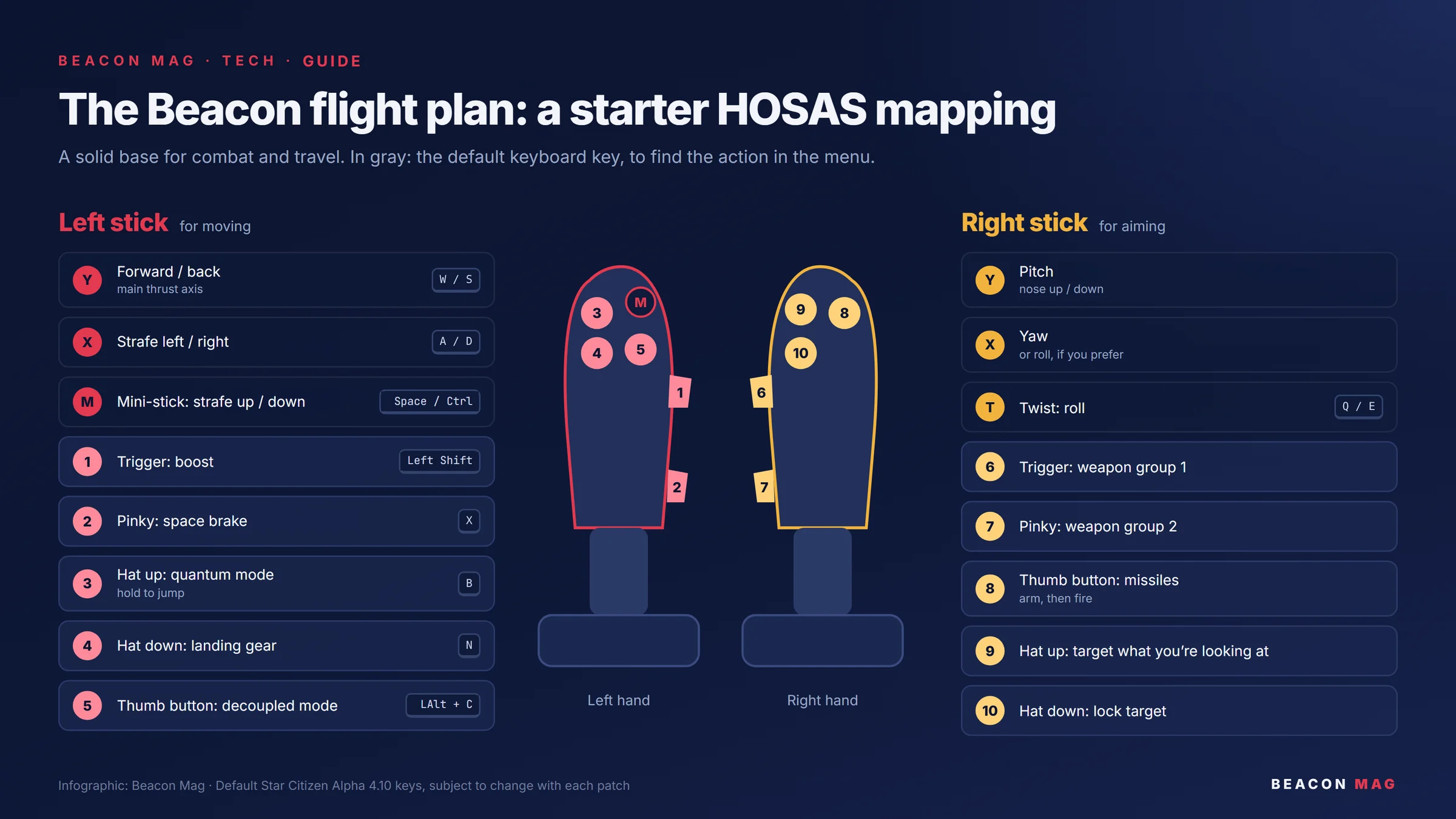
In the ACC, select the Joystick device, open the flight categories, click an action, then move the axis or press the button you want: it’s bound. Here’s our starter HOSAS layout.
Left stick: for moving
- Y axis → Strafe Forward/Backward: move forward and back. Make sure to use strafe, not a fixed throttle setting.
- X axis → Strafe Left/Right: lateral strafing.
- Mini-stick → Strafe Up/Down: move up and down.
Right stick: for aiming
- Y axis → Pitch: nose up or down.
- X axis → Yaw: nose left or right. This is the setup combat pilots prefer. If you come from flight sims, put roll here instead.
- Twist → Roll: roll. If your right stick has no twist axis, put roll on the left stick’s twist.
Once all your axes are set, take a first test flight before moving on to buttons: an inverted axis shows up right away.
Buttons, in order of urgency
Start with what you need in the middle of a fight, and finish with comfort features.
- Combat: weapon group 1 on the right trigger, group 2 on the pinky button, missiles under your thumb, and targeting on a hat (target what you’re looking at, lock target).
- Flight: boost (Left Shift by default) on the left trigger, space brake (X) on your pinky, decoupled mode (Left Alt + C) under your left thumb.
- Utilities: quantum mode (B, hold to jump), landing gear (N), landing request (Left Alt + N).
Three tips to go further
- Short press or long press: many actions come in a Tap (short press) and a Hold (long press) version, so one button can do two things.
- A “Shift” button: the VKB, Virpil and Thrustmaster software lets you create a modifier button that doubles every other button. It’s extremely handy with HOSAS.
- Explicit commands: for startup sequences, choose “turn on” style actions rather than an on/off toggle. Otherwise, depending on the ship’s state, your button might switch off what you meant to switch on.
Step 5: fine-tune and test
Launch Arena Commander in Free Flight, solo. Check each axis for inversion, then adjust:
- the dead zone: the bare minimum to keep the ship still when you let go of the stick, no more;
- the curve: a slightly gentler curve around the center gives you precision for aiming, without losing rotation speed at full deflection.
Step 6: save and export
In the ACC, save your profile under a clear name using the profile save feature (Control Profiles). The XML file lives here:
…\Roberts Space Industries\StarCitizen\LIVE\user\client\0\controls\mappings\Copy that folder somewhere else, especially before deleting the USER folder (a common fix for error 30000) or before a big patch. To restore it, put the file back in that folder and reload it from the ACC. Future you will thank you.
Quick troubleshooting
- My sticks swapped: type
pp_resortdevices joystick 1 2in the console (the ~ key on a US keyboard). To fix the problem for good, the vJoy + HidHide + Joystick Gremlin combo merges your sticks into one virtual device that never moves. Note: the old DevReorder tool no longer works since Easy Anti-Cheat arrived. - A binding disappeared after a patch: CIG sometimes renames or moves actions. Reload your profile and look in the ACC for bindings flagged as unassigned.
- You want a ready-made profile: BuzZz Killer’s profiles, updated for 4.10 in August 2026, cover dual T.16000Ms, the VKB SCE Premium and the Virpil Alpha and Alpha Prime. Most of them need JoyToKey to handle the modifier key, and their author announced in April 2026 that he was cutting back on the devices he supports, so check that yours is still up to date. For the SOL-R 2, Thrustmaster publishes its own profile.
That’s it, your cockpit is ready. All that’s left is to botch your first landing with far more precision than before.



Comments 0
No comments yet: start the conversation!
Your Discord name and picture will sign your comment. Be courteous: inappropriate comments are removed.