

Patch 2.2: images, full size
Site news and patches 0 replies Followed by 0 members

Beacon Mag team Administrator
A small patch, but a handy one: images in articles and events now open full size, in a viewer.
An image viewer
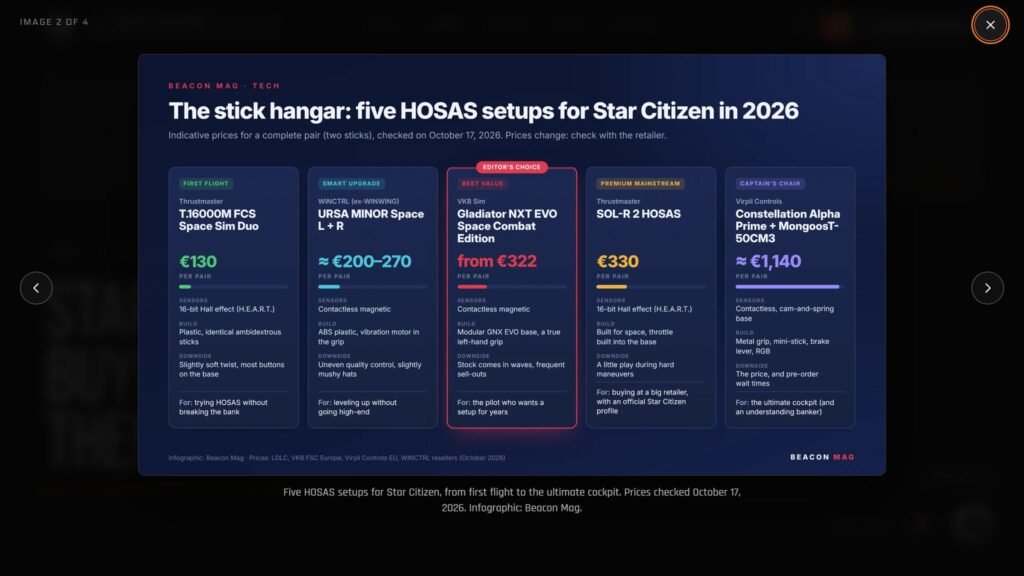
- Click an image in an article or an event to open it full size, in high definition, with its caption. Perfect for reading our infographics in detail.
- Move from one image to the next with the arrows, on screen or on your keyboard; a counter shows where you are. On a phone, just swipe.
- To close it: the cross, the Esc key or a click next to the image.
- It works on every article, old and new, in French and in English.
Try it right now on our Star Citizen joysticks feature and its four infographics.
An idea, a bug, a comment? Reply to this topic, we read everything!
Join the discussion
Se connecterYour Discord name and picture will sign your messages. Be courteous: inappropriate messages are removed.