

[GUIDE] Star Citizen 4.10.2: the great bestiary of bugs (and how to survive them)
Bugs & fixes 0 replies Followed by 0 members

JakeCook Administrator
Updated 19 October 2026, Alpha 4.10.2 LIVE.
📚 New: every bug now has its own detailed sheet, with its fixes. Find them all in the Bugs & fixes contents.
You’ve just bought a ship for a price we won’t tell your bank manager about. You launch the game, and a 30000 error greets you before you’ve even left your hab. We’ve all been there.
Star Citizen is an alpha, and we love it anyway. This guide gathers the known errors and bugs of the current version, with official workarounds and the ones the community has tested. Everything is explained in plain terms, no engineering degree required.
How to read this guide:
- 🟢 Official: a fix given by CIG (RSI support, patch notes).
- 🟡 Community: a player tip. It often works, no guarantees.
- 🔴 No workaround: you’ll have to wait for a fix.
🧭 Jump straight to your problem
| What’s happening to you | Section |
|---|---|
| I don’t know where to start | 0. The first-aid kit |
| Red “Installer Error” window | 1.1 |
| Code 2000, 5007, 5008, 5012, 5021… in the launcher | 1.2 |
| The update won’t start or gets stuck | 1.3 |
| The launcher crashes, or the Launch button is gone | 1.4 |
| Can’t sign in to the launcher (code:error, 403) | 1.5 |
| Error 19000 (19k) | 2.1 |
| Error 30000 (30k), kicked out of the game | 2.2 |
| Error 60000 (60k), 60010, 60015, 60016, 60030 | 2.3 |
| Infinite loading, 41013, 41070, empty “Select System” menu | 2.4 |
| Error 70000, Easy Anti-Cheat | 3 |
| Game crashes, stutters, FPS drops | 4 |
| Ship missing, Retrieve button greyed out, ASOP | 5.1 |
| Elevator or freight lift stuck | 5.2 |
| Stuck, slow character, can’t move | 5.3 |
| Items gone, unexplained suffocation | 5.4 |
| Bugged mission | 5.5 |
| Reporting a bug | 7 |
| What’s a shard, the ASOP, the USER folder? | 8. Glossary |
0. 🧰 The first-aid kit
Around 80% of problems are solved with the same moves, done in order, from the gentlest to the most drastic.
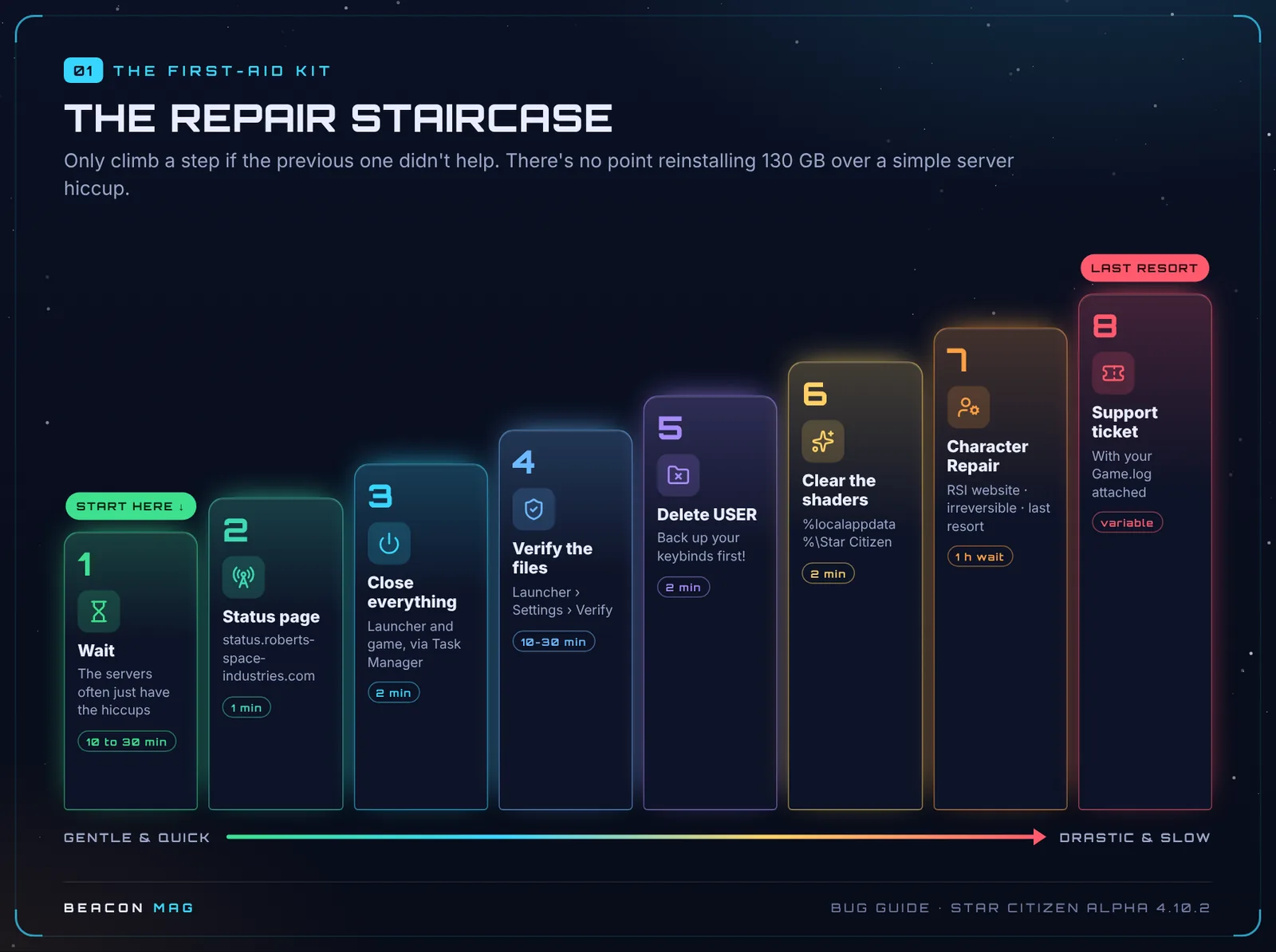
[1] Wait (10 to 30 minutes). Many errors come from the servers. For 60k errors, waiting is actually the main fix.
[2] Status page 🟢. Go to status.robertsspaceindustries.com. If there’s an outage, nothing you do on your PC will change it.
[3] Close everything for real 🟢. Right-click the RSI icon next to the clock, then Quit. Then open Task Manager (Ctrl + Shift + Esc) and end any RSI Launcher and StarCitizen processes still running. Several launchers open at once cause errors on their own.
[4] Verify the files 🟢. In the launcher: Settings › Games › LIVE › Verify. Avoid running heavy software while it checks.
[5] Delete the USER folder 🟢. It holds your local settings. Deleting it doesn’t touch your account, your fleet or your aUEC.
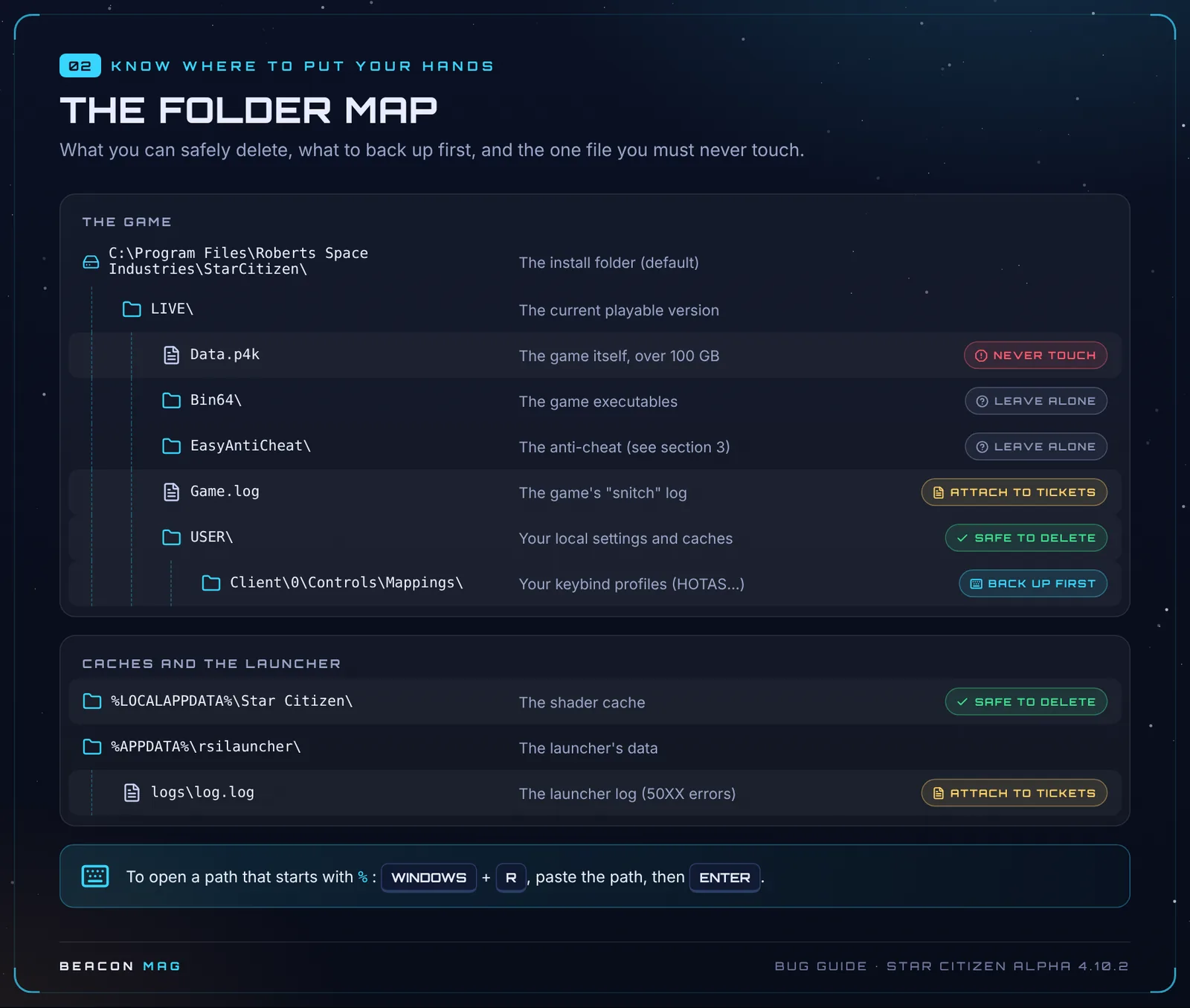
💡 Back up your keybinds first! Copy the
USER\Client\0\Controls\Mappingsfolder to your desktop.
[6] Clear the shaders 🟡. After a big patch or a graphics driver update: Windows + R, type %localappdata%\Star Citizen, then delete the folder’s contents. The next launch will be slower, that’s normal. (CIG doesn’t officially publish these paths: they’re the ones the community uses.)
[7] Character Repair 🟢 (last resort).
- Report your problem on the Issue Council first.
- On the RSI website, go to Account Dashboard › Settings › Character Repair.
- Wait at least 1 hour before logging back in. Logging in too early has caused further account problems.
What the repair does: you respawn at your spawn point, equipped items are moved to your inventory, and your aUEC, reputation and ships are left untouched.
⚠️ Once started, it can’t be undone. It doesn’t fix ship bugs, lost cargo or CrimeStat, and items that were already lost don’t come back. RSI describes it as a last resort.
[8] Support ticket, with your Game.log attached (section 7).
Small network fixes, useful everywhere:
| Fix | How |
|---|---|
| Flush the DNS cache 🟢 | Open cmd as administrator and type ipconfig /flushdns |
| Sync your clock 🟢 | Windows Settings › Time & language › Sync now |
| Turn off your VPN or proxy 🟢 | A classic cause of 19k, 30k and 403 errors |
| Whitelist the game 🟢 | Add RSI Launcher.exe and StarCitizen.exe as exceptions in your antivirus and firewall |
| Change region 🟡 | In the game menu, switch from Best to a specific region (EU, US…) |
1. 🛠️ The launcher is acting up
1.1 “Installer Error” (red window)
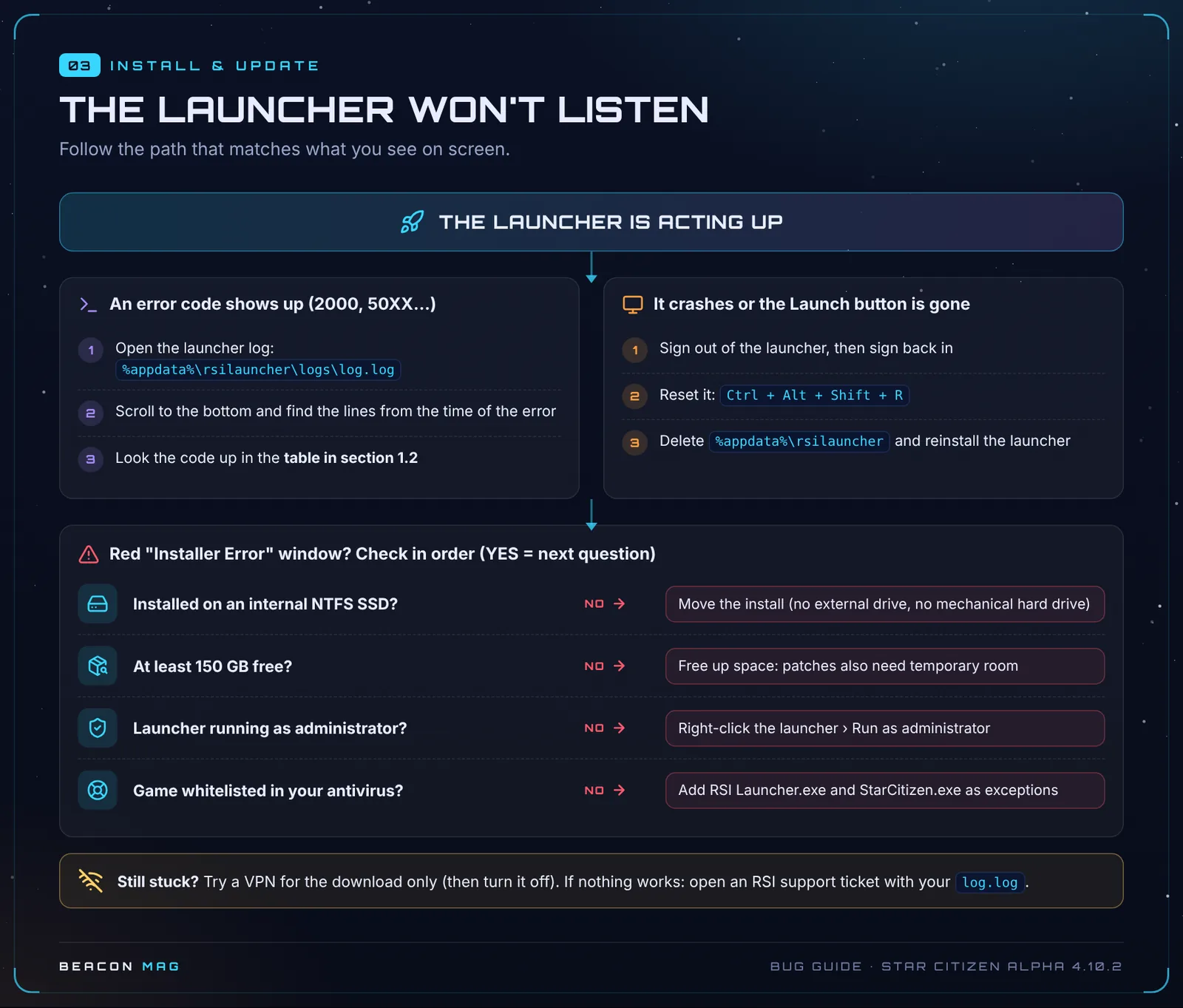
Check these points in order:
- 🟢 The game is installed on an internal SSD formatted as NTFS. External drives are blocked and mechanical hard drives aren’t supported in practice. Don’t install the game in Desktop, Documents or Downloads either.
- 🟢 You have 150 GB free on that SSD, plus headroom for patches.
- 🟢 You run the launcher as administrator.
- 🟡 Close unnecessary software and unplug peripherals you don’t need.
- 🟡 Delete
%APPDATA%\rsilauncherand%APPDATA%\RSI, then reinstall the launcher. - 🟡 Try a VPN for the download only, then turn it off.
1.2 Errors 2000 and 50XX
To find the exact cause, open %appdata%\rsilauncher\logs\log.log, scroll to the bottom and find the lines from the time of the error.
| Code | Meaning | Fix 🟢 |
|---|---|---|
| 5007 | Network drop | Restart the download or clear the launcher cache. Otherwise, try a VPN 🟡 |
| 5008 | Network problem during install | In LIVE, rename Data.p4k to Data.p4k.part, then run the launcher as admin and click Install without interrupting it |
| 5009 | Windows permissions | Create the LIVE folder manually, then retry (as admin if needed) |
| 5010 | Corrupted files | Verify, otherwise reinstall |
| 5012 | Network problem | Turn your VPN on or off, restart your router, switch from Wi-Fi to cable (or the other way round), lower the download speed |
| 5013 | Unknown cause | 🔴 Follow the general steps |
| 5015 to 5018 | Fatal network error | Verify, then the 5012 steps |
| 5021 | Sector size of some NVMe SSDs on Windows 11 | See the box below |
🔧 Error 5021, for careful users. 1) Back up your registry. 2) Open Command Prompt as administrator and type the command below. 3) Restart your PC. If you don’t know what the registry is, ask for help on the Discord before going ahead.
REG ADD "HKLM\SYSTEM\CurrentControlSet\Services\stornvme\Parameters\Device" /v "ForcedPhysicalSectorSizeInBytes" /t REG_MULTI_SZ /d "* 4095" /f1.3 The update won’t start or gets stuck 🟡
- The Update button resets itself: create the
...\StarCitizen\LIVEfolder manually, at the location shown in Settings › Library Folder. - The download crashes: use a cable if you can, set the speed below your real bandwidth (the launcher counts in MB/s: divide your plan’s Mb/s by 8), limit it to 5 simultaneous downloads, then restart your router and PC.
1.4 The launcher crashes or the Launch button is gone 🟡
- Sign out of the launcher, then sign back in. It often happens when your IP address changes.
- Press
Ctrl + Alt + Shift + Rto reset the launcher. - If it keeps crashing, try in order: delete
%LOCALAPPDATA%\Star Citizen, then theUSERfolder, thenLIVE\Bin64followed by a Verify. - Last resort: delete
%APPDATA%\rsilauncherand reinstall the launcher.
1.5 Can’t sign in to the launcher
- 🟢 “Sign In Failed – code:error” (usually a two-factor authentication failure): fully close the launcher, sign out of the RSI website, sign in to the RSI website in a private browsing window and leave it open, then relaunch the launcher and sign in. After too many failures, wait 30 minutes.
- 🟡 Error 403 / API Denied: turn off your VPN or switch VPN server. CIG has no confirmed fix yet.
2. 🌐 Connection and loading: the “K” family
The universe is split into shards (copies of the universe), themselves spread across several servers. If your character isn’t “stored” cleanly in its shard, the errors below show up.
| Error | In plain terms | What to do |
|---|---|---|
| 19000 | Authentication failed | Section 2.1 |
| 30000 | The server dropped you | Don’t claim the insurance! Section 2.2 |
| 30003 | Abnormal network packet | 🟢 Uninstall “network optimiser” software (such as cFosSpeed), then Verify |
| 30009 / 30018 | Often after logging out inside a ship | 🟡 Wait, or ask a friend to destroy your ship if it’s still in the world |
| 30023, 30031, 30060-30064 | Your game version doesn’t match the server’s | 🟢 Run the launcher as admin, then Verify |
| 30028 | Kicked for inactivity | 🟢 Sync your Windows clock |
| 30030 / 30036 | Sanction | 🟢 RSI support only |
| 41013 / 41070 | Loading stuck | Section 2.4 |
| 60010 / 60016 | Often: no Game Package | Section 2.3 |
| 60015 | The game instance isn’t working | 🟡 Change region |
| Other 60k | Server-side failure | 🟢 Wait about 30 minutes |
| 64004 to 64006 | Character problem | 🟢 Character Repair, otherwise a ticket |
2.1 Error 19000 (19k) 🟢
It shows up when servers are overloaded, after a long absence or on patch day. In order:
- Check that your account has a Game Package.
- Sign out of the launcher, wait a few minutes, then sign back in.
- Keep only one launcher open.
- Flush the DNS cache (
ipconfig /flushdns). - Sync your Windows clock.
- Turn off your VPN and whitelist the game in your antivirus and firewall.
- Run a Verify.
😏 On patch night, the 19k is part of the experience. Think of it as a queue with character.
2.2 Error 30000 (30k)
The server crashed or your connection timed out. A new server then starts and recovers the state of the world.
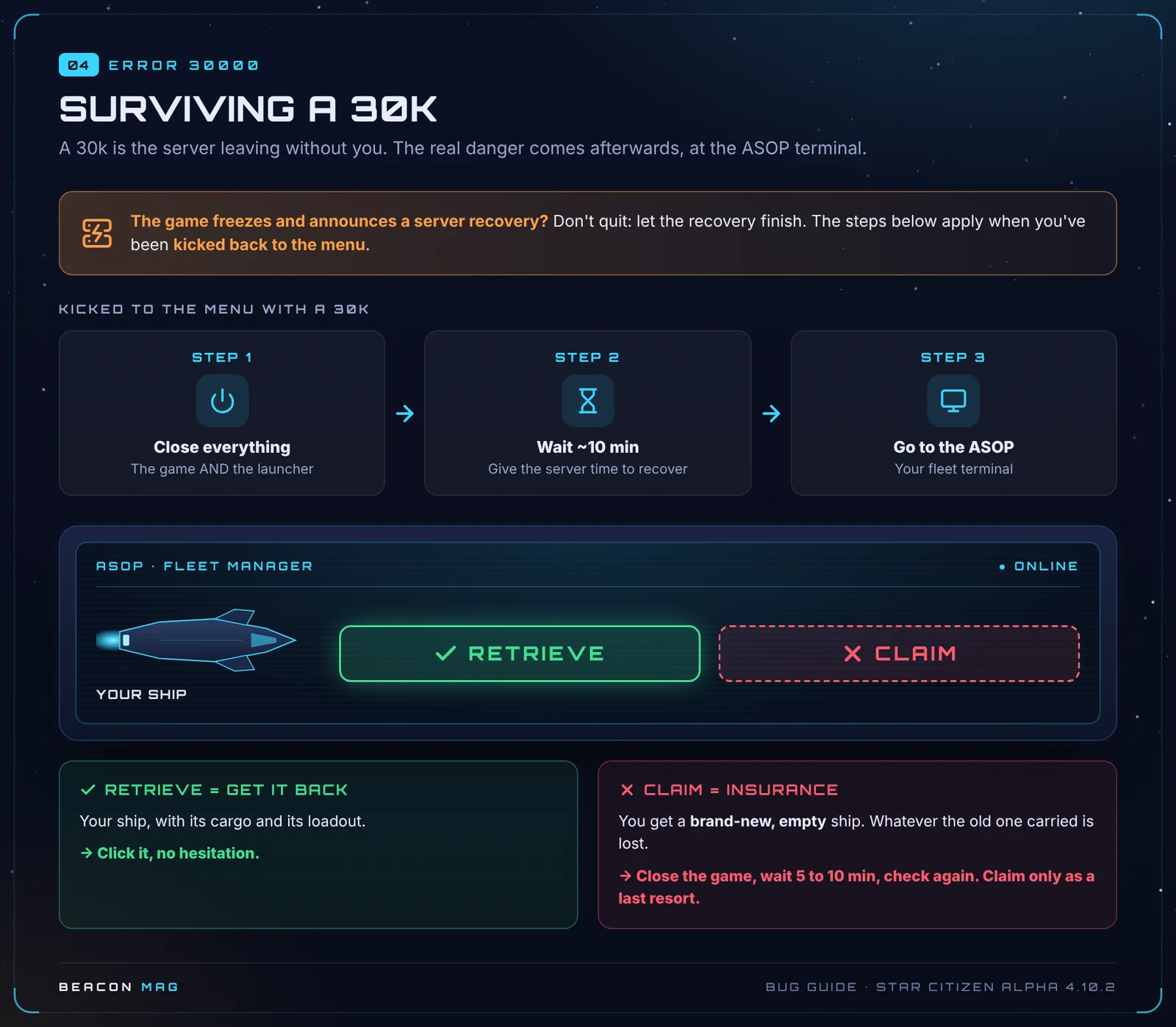
- 🟡 If the game freezes and announces a server recovery, don’t quit. Let the recovery finish.
- 🟡 If you’re kicked back to the menu: close the game and the launcher, wait about 10 minutes, then log back in.
- 🟢 At the ASOP terminal, pick RETRIEVE, never CLAIM. Claim files an insurance claim: you get a brand-new, empty ship. If only Claim shows up, close the game, wait 5 to 10 minutes and check again.
If 30k errors keep coming back 🟢:
- If it started after logging out or crashing in a ship or a ship bed, run a Character Repair.
- Check the minimum specs, especially the SSD.
- Flush the DNS cache or change DNS server, and turn off your VPN.
- Delete the USER folder, then run a Verify.
- Don’t quit the game during the tutorial.
2.3 60000 errors (60k) and shard lock
These errors come from RSI’s services, not your PC. A shard lock is when the game thinks your character is still in a shard that no longer responds.
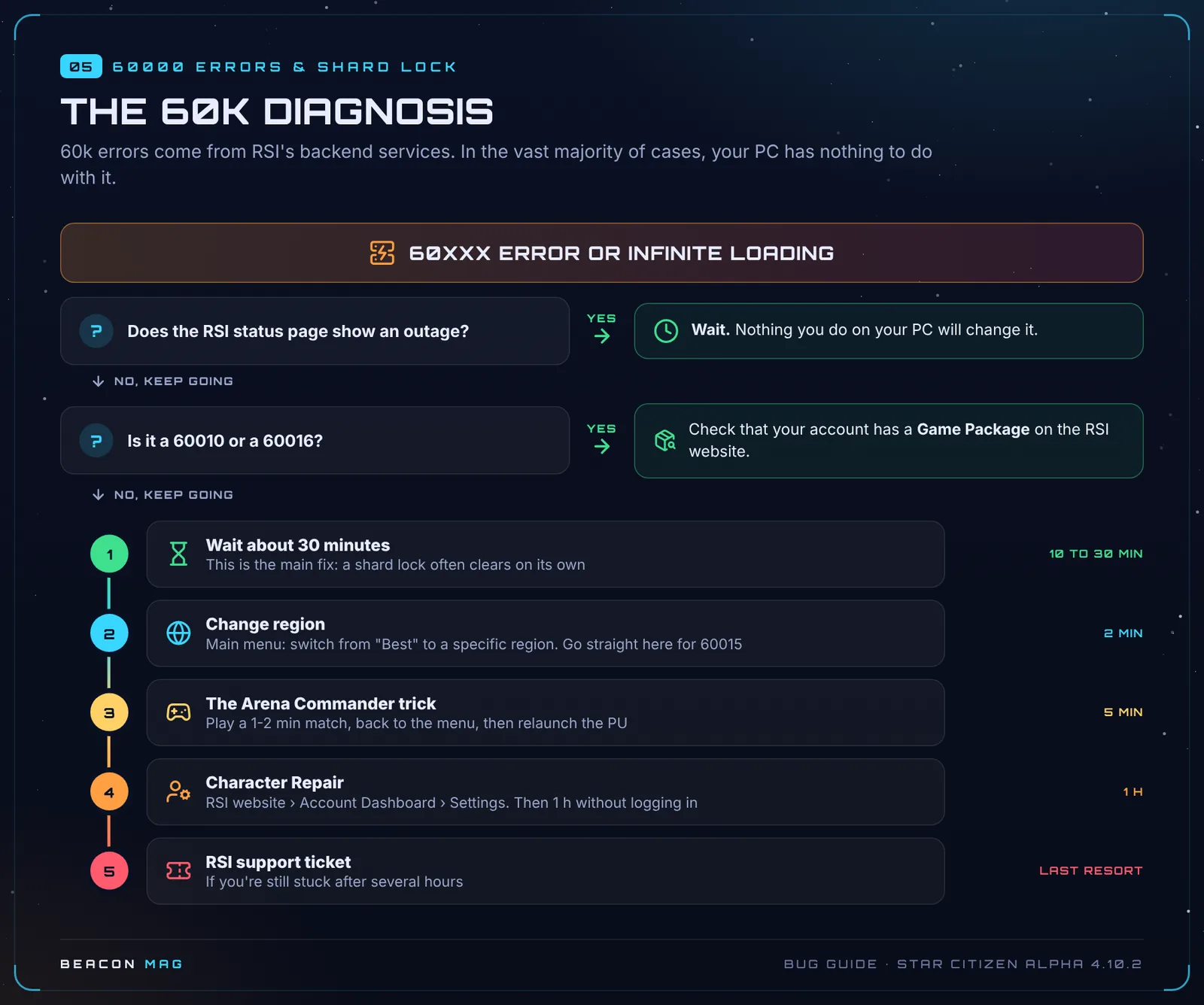
- 🟢 Wait about 30 minutes. This is the main fix. If it lasts much longer, it’s probably a real problem.
- 🟢 Error 60010 or 60016: check that your account has a Game Package, especially if you’ve just bought one back through buyback.
- 🟡 Error 60015: change region.
- 🟡 Other 60k errors: follow the 30k steps.
- 🟡 “Server at capacity”: the shard is full. Try again later or change region.
- 🟢 Still stuck after several hours: open a ticket.
2.4 Infinite loading, 41013, 41070
Try these fixes in order:
- 🟡 Change region. It sometimes takes several tries.
- 🟡 The Arena Commander trick: play a one- or two-minute match, return to the menu, then relaunch the persistent universe (PU).
- 🟡 The console: press the key below Esc (
~on a QWERTY keyboard), typeQUIT, press Enter, then relaunch the game. - 🟢 Error 41070: wait 10 to 15 minutes. You can also join a friend’s party: the party leader then enters the PU.
- 🟢 Error 41013: a Character Repair usually fixes it. Your personal hangar may temporarily disappear afterwards.
- 🟢 Delete the USER folder and run the launcher as administrator.
Other cases:
- 🟢 Empty “Select System” menu: your account has no Game Package, or maintenance is under way. Otherwise: close everything, wait a few minutes, then check your antivirus or restart your PC.
- 🟡
<=BAD TOKEN=>(often after a 30k): restart the client. - 🔴 You lose your mouse and all interaction when you arrive in the PU: no workaround. A Character Repair won’t change anything. Report it on the Issue Council (STARC-212814).
3. 🛡️ Easy Anti-Cheat (70000 errors)
| Error | Fix |
|---|---|
| 70001 to 70007 | 🟢 Fully close the game and the launcher, then retry. Then Verify, then support |
| 70008 to 70010 (sanctions) | 🟢 RSI support or Player Relations only |
| “Failed To Initialise Game Launcher” | 🟡 Reinstall the launcher |
“EAC is not installed” 🟢: run a Verify, then start the launcher as administrator. If that’s not enough, open PowerShell as administrator and type these two commands:
cd "C:\Program Files\Roberts Space Industries\StarCitizen\LIVE\EasyAntiCheat\"
.\EasyAntiCheat_EOS_Setup.exe install 54540c7a80fe48ea92ead64506b4ff53
EAC logs are in %appdata%\EasyAntiCheat\. They’re useful to attach to a ticket.
4. 💥 Crashes and performance
- 🟢 Crash to desktop, error 3221225477 (Vulkan): if you have an Nvidia card on driver 616.56, roll back to the previous driver or switch the game to DirectX 11.
- 🟢 FPS drops on Vulkan: lower the resolution, update your driver or switch to DirectX.
- 🟡 Stutters after a patch or a new driver: clear the shader cache.
- 🔴 FPS drop when opening the starmap: known bug.
Current minimum specs 🟢:
| Component | Minimum | Recommended |
|---|---|---|
| OS | Windows 10/11 64-bit | Windows 11 |
| CPU | 4 cores with AVX, AVX2 and FMA3 | Ryzen 7 5800X3D / i7-12700K |
| RAM | 16 GB | 32 GB |
| Graphics card | 4 GB VRAM, DirectX 11.1 and Vulkan 1.2 | 8 GB VRAM or more |
| Storage | 150 GB on SSD (required) | NVMe SSD |
💡 🟡 With 16 GB of RAM, the game can ask for 18 to 24 GB in busy areas. Keep at least 32 GB free on your fastest SSD for the Windows page file.
😏 On a mechanical hard drive, expect 5 to 10 minutes of loading. Total immersion in the slowness of interstellar travel.
5. 🐛 In-game bugs (4.10.2)
Tips followed by a version number in brackets come from players, on an older patch. They may no longer work.
5.1 ASOP terminals and ships
| Bug | Workaround |
|---|---|
| Retrieve button greyed out | 🟡 Go to your hangar, return to the menu, reload the game (4.9). Another reported option: buy a medpen or use a medbed. A server fix is being tested |
| Deliver option missing (Levski, Checkmate…) | 🟢 Restart the game or go somewhere else |
| Rental ships not showing | 🟡 Restart your router and flush the DNS cache |
| Ship under the landing pad | 🟡 Store it from the lobby, then retrieve it from the hangar ASOP (4.1.1) |
| Stuck on “Repositioning Player” at Area18 | 🟢 Return to the main menu and log back in |
| Renaming a ship deletes its equipment | 🟢 Remove non-stock parts before renaming |
| Hull-A delivered with cargo arms extended | 🟢 Retract them before storing the ship |
| Quantum snare or dampener missing from the console | 🟢 Start a quantum jump first |
| Drake Command Module radar not working | 🟢 Undock the module, then redock it |
| Salvage audio stuck in a loop | 🟢 Restart the game |
| Docked ships gone after logging out in a carrier bed (Idris, Polaris, Tyilui) | 🔴 Avoid logging out on board with docked ships |
| Components catching fire | 🔴 No workaround |
| Loadout insurance | 🟡 Re-insure after every change, and restock your missiles first |
5.2 Elevators
| Bug | Workaround |
|---|---|
| Your hangar doesn’t show on the panel | 🟡 Don’t use another player’s elevator, call a fresh one (3.24) |
| The freight lift won’t come back up | 🟡 From the kiosk, exit and re-enter several times until it kicks you out (4.8.1) |
| Mission freight lift doesn’t register the delivery | 🟡 Always use the kiosk first |
| Checkmate elevators out of order | 🔴 Have a plan B |
5.3 Movement and locations
| Bug | Workaround |
|---|---|
| Can’t move after using chat | 🟡 Press Enter, then Esc twice (4.5) |
| Stuck strafing after opening a storage container | 🟡 Near an ASOP, switch to F4 view and double-click the screen (4.0) |
| Character slow or out of breath quickly | 🟡 Go to a planet and press Backspace to respawn (3.24) |
| Stuck after jumping a railing at Levski | 🟢 Don’t jump! Otherwise, forced respawn |
| The Lorville tram can kill | 🟢 Move away from the doors once on board |
| Repair or refuel unavailable | 🟢 Wait for the hangar doors to close, then close and reopen the mobiGlas |
| Landing Services app not updating | 🟢 Wait, then close and reopen the app |
| Keycard printer timer stuck at 00:00 | 🟢 Alt + F4, then log back in |
| Klescher prison sentence resetting | 🟢 Avoid any infraction, or stay offline until the sentence ends |
| Lost access to your personal hangar (unconfirmed) | 🟡 Avoid storing things there or decorating it for now |
5.4 Inventory
| Bug | Workaround |
|---|---|
| Unexplained suffocation | 🟢 You have two helmets equipped. Remove the extra one |
| Items replaced by fire extinguishers | 🔴 The ’verse works in mysterious ways |
| Items lost when swapping armour with a full inventory | 🔴 Always keep free space |
| Dropped weapon attachments can’t be picked up | 🟢 Don’t drop them |
| Items missing when you come back | 🟢 Look near the bed in your hab |
| Crafted items showing no bonus | 🟢 Equip the item, then reread its description |
| Pledge items missing | 🟡 A Character Repair has helped some players |
5.5 Missions
| Mission | Advice |
|---|---|
| Empty mission history | 🟢 Display bug, your credits are saved |
| Underground facilities | 🟢 After turning in the mission, you have about 15 minutes before the guards turn hostile |
| “Repel Raid on Orison” | 🟢 Don’t accept it: the enemies don’t spawn, and abandoning it lowers your reputation |
| “Evict Illegal Occupants” | 🔴 Avoid |
| Boarding Action, tutorial, large delivery targets (Wikelo) | 🟡 Avoid for now |
6. 🏅 The golden rules
- Never quit the game during a server recovery.
- At the ASOP terminal: Retrieve, never Claim (except as a last resort).
- Store your ships before a patch.
- Log out in a bed in your hab or a station rather than on board a ship.
- Back up your
Mappingsfolder. - Keep space in your inventory.
- Only open one launcher at a time.
- Character Repair only as a last resort, then 1 hour without logging in.
- Check the status page before taking everything apart.
- Stay calm. It’s an alpha, and we love it anyway.
7. 📣 Reporting a bug properly
- Issue Council: first check whether the bug already exists (STARC-xxxxx reference) and confirm it rather than opening a duplicate.
- RSI support ticket: for anything to do with your account (items, sanctions, stuck character).
- Attach: the error code and time, the
Game.logfile (in theLIVEfolder), the launcher’slog.logif it’s a launcher problem, and your PC specs.
Found a workaround that works? Post it as a reply and we’ll add it to the guide with credit.
8. 📖 Glossary
| Term | Explanation |
|---|---|
| PU | The persistent universe, the “real” game |
| Shard | A copy of the universe, shared by hundreds of players |
| Shard lock | Your character is stuck in a shard that no longer responds |
| ASOP | The terminal where you call and store your ships |
| Retrieve / Claim | Get your ship back / file an insurance claim (new but empty ship) |
| Game Package | The game pack you can’t play without |
| USER folder | Your local settings, safe to delete without risk to your account |
| Shaders | Your graphics card’s rendering cache |
| Character Repair | The last-resort tool that puts your character back in a clean state |
| Issue Council | The official bug-reporting platform |
See you in the ’verse, servers permitting. o7
Sources: RSI support (Known Issues 4.10.2, Character Repair, Error 2000 or 50XX), patch notes and Community Tech Support on Spectrum, Star Citizen Wiki, Microsoft Learn, StarCitizenHelp, UEX and Star Citizen Public Advisory. Illustrations: Beacon Mag. Star Citizen is a game by Cloud Imperium Games.
Join the discussion
Sign in with DiscordYour Discord name and picture will sign your messages. Be courteous: inappropriate messages are removed.