

[BUG] The first-aid kit: 8 moves that fix 80% of problems
Bugs & fixes 0 replies Followed by 0 members

JakeCook Administrator
Before taking everything apart, start here. Around 80% of Star Citizen problems are solved with the same moves, done in order, from the gentlest to the most drastic. Only move on to the next step if the previous one didn’t help.
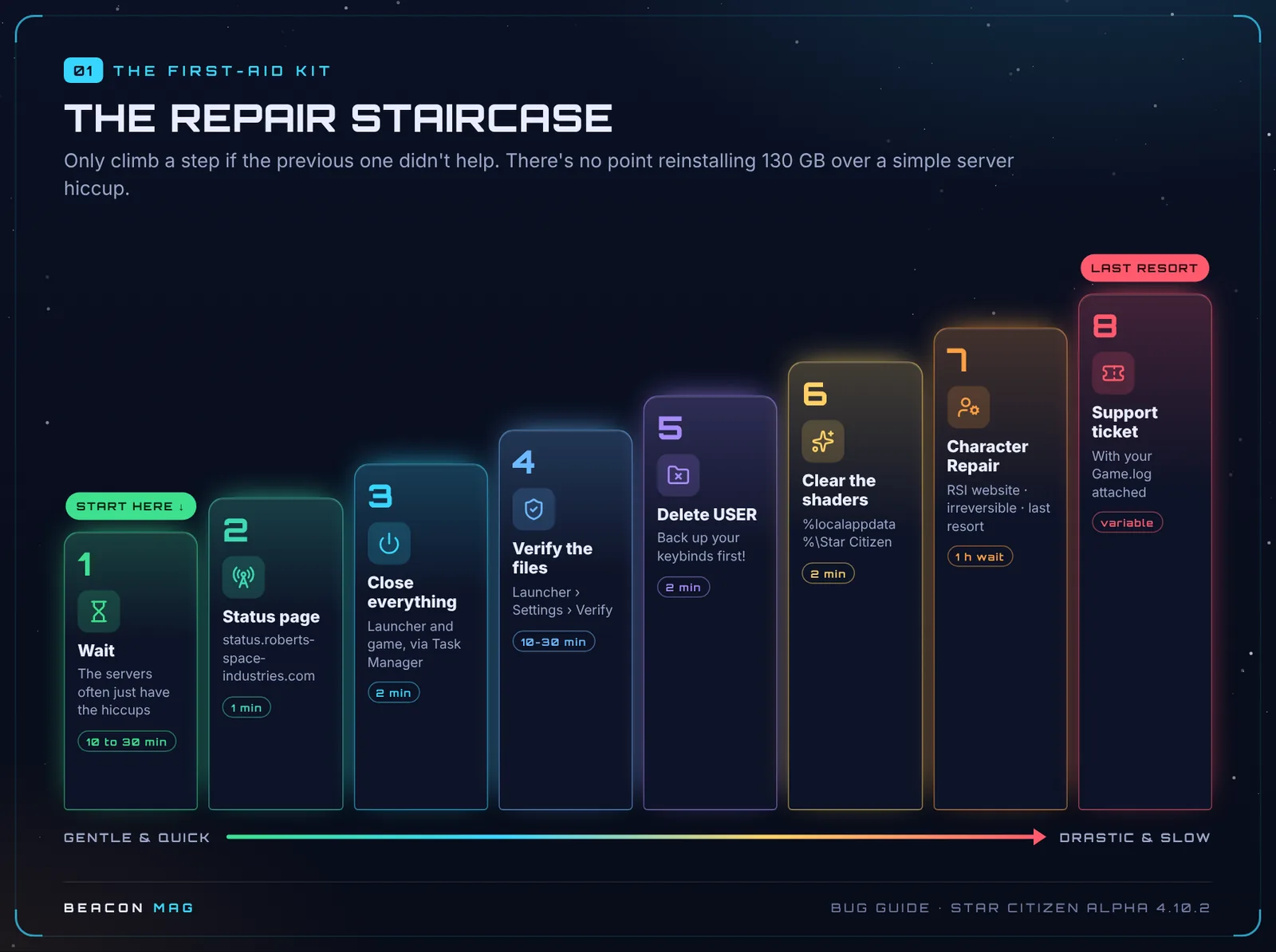
The 8 steps
[1] Wait 10 to 30 minutes. Many errors come from the servers. For 60k errors, waiting is actually the main fix.
[2] Check the status page 🟢. Go to status.robertsspaceindustries.com. If there’s an outage, nothing you do on your PC will change it.
[3] Close everything for real 🟢. Right-click the RSI icon next to the clock, then Quit. Then open Task Manager (Ctrl + Shift + Esc) and end any RSI Launcher and StarCitizen processes still running. Several launchers open at once cause errors on their own.
[4] Verify the files 🟢. In the launcher: Settings › Games › LIVE › Verify. Avoid running heavy software while it checks.
[5] Delete the USER folder 🟢. It holds your local settings. Deleting it doesn’t touch your account, your fleet or your aUEC.
💡 Back up your keybinds first! Copy the
USER\Client\0\Controls\Mappingsfolder to your desktop, then put it back afterwards.
[6] Clear the shaders 🟡. After a big patch or a graphics driver update: Windows + R, type %localappdata%\Star Citizen, then delete the folder’s contents. The next launch will be slower, that’s normal.
[7] Character Repair 🟢, as a last resort. It puts your character back in a clean state. Read our Character Repair guide first: once started, it can’t be undone.
[8] RSI support ticket, with your Game.log file attached (see reporting a bug).
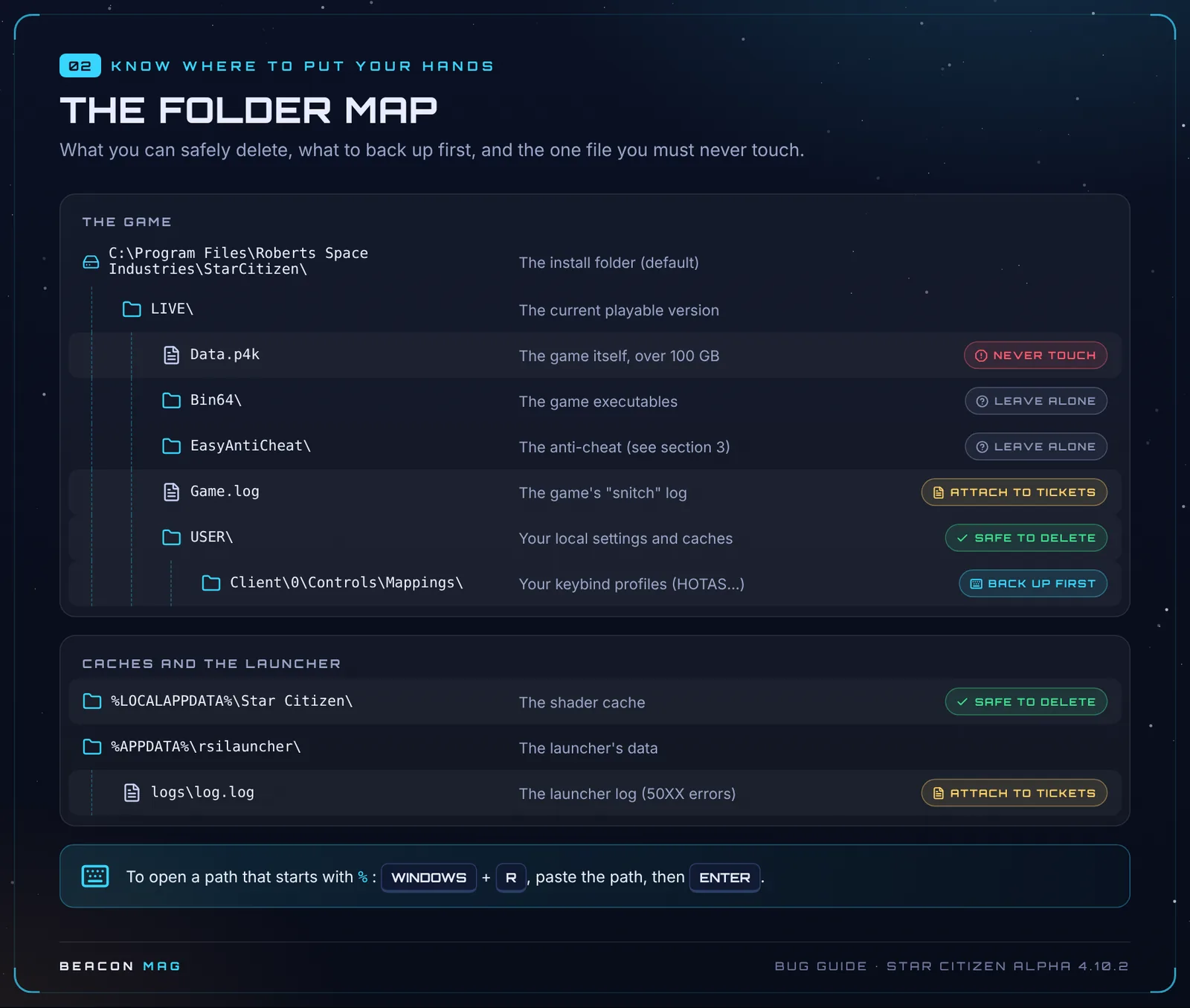
📁 What you can delete, and what you must never touch
🌐 Small network fixes, useful everywhere
| Fix | How |
|---|---|
| Flush the DNS cache 🟢 | Open cmd as administrator and type ipconfig /flushdns |
| Sync your clock 🟢 | Windows Settings › Time & language › Sync now |
| Turn off your VPN or proxy 🟢 | A classic cause of 19k, 30k and 403 errors |
| Whitelist the game 🟢 | Add RSI Launcher.exe and StarCitizen.exe as exceptions in your antivirus and firewall |
| Change region 🟡 | In the game menu, switch from Best to a specific region (EU, US…) |
Key: 🟢 official CIG fix · 🟡 community tip, no guarantees · 🔴 no workaround, you’ll have to wait for a fix.
🆘 Still stuck?
Work through the first-aid kit in order, then report the bug properly. Found another tip that works? Post it as a reply and we’ll add it to this sheet with credit.
📚 Every bug and its fix (contents) · 📖 The great bug bestiary, on a single page
Sheet 01 · Alpha 4.10.2 LIVE, updated 19 October 2026. Sources: RSI support (Known Issues 4.10.2), patch notes and Community Tech Support on Spectrum. Star Citizen is a game by Cloud Imperium Games.
Join the discussion
Sign in with DiscordYour Discord name and picture will sign your messages. Be courteous: inappropriate messages are removed.